Events & festivals
Organize a festival, social or workshop. Sell passes on Danza, or list an event that uses your own ticket page.
Ticketing: €1 platform fee per ticket. Listings go through review.
For dance partners
Create your partner account, build your event and sell tickets with Danza. Your passes, attendees and event tools—all in one place.
€1 platform fee per ticket · No upfront platform cost
Choose what you want to do, sign in if needed, then confirm the partner terms in one short step. Nothing is activated until you agree.
Choose how to start
Tickets, event, school or online program.
Confirm partner terms
A single, clear activation step.
Open your workspace
Continue directly to the action you chose.
Represent a dance school, teach online or already use another ticket platform? Your partner account supports those too.
More possibilities
Event ticketing is just the beginning. Your partner access also lets you list a school, share an online program or link an event that sells elsewhere.
Organize a festival, social or workshop. Sell passes on Danza, or list an event that uses your own ticket page.
Ticketing: €1 platform fee per ticket. Listings go through review.
Help dancers find your school, your styles and where to join classes. Link to your official website or social pages.
Already listed? Search first and request ownership.
List your dance schoolShare video courses, memberships or online classes. Dancers discover your program and sign up at your official destination.
Keep your existing course or enrollment platform.
Add your online programDanza reviews directory listings and ownership requests. Choosing an option does not approve publication or activate payouts. You keep your personal profile and tickets.
For event organizers
Danza uses Stripe Connect (marketplace-style payouts). You set ticket prices; the platform keeps a fixed €1 per ticket. No percentage-based platform fee. Ticket pricing applies when you sell tickets through Danza, not when you simply link to your own school or online program.
Simple, predictable pricing. No percentage commission from your ticket price.
No subscription, no setup or monthly fee, no percentage commission. You receive the full listed ticket price; by default the buyer covers the €1 and card processing. What you see in the calculator is what lands in your bank.
Offer refundable passes and let dancers transfer a pass to a friend — with the deadlines and fees you choose. Refund holds, approvals and payouts are handled for you, so a partner dropping out never becomes your support ticket.
Sales, team, promoters, payouts and reports live in the Danza app. Switch between your festivals and roles in a tap — from the venue, the airport, or the dance floor.
Passes land in the buyer's app instantly, with a reminder before the event. Update the schedule or venue and everyone holding a pass gets the news — no mass emails, no WhatsApp chaos.
One page with your tickets, Facebook event, Instagram, WhatsApp group, playlist — fully yours: colors, gradients, order, icons and intro text. Put it in your bio instead of a Linktree.
Your staff scan QR passes with their own phones. Fast lines, live check-in counts, and one role that can do nothing else — simple and secure.
Team & dashboard
Most ticketing tools stop at checkout. Danza gives you a full dashboard to run sales, your team, and the door — with filters, labels, and reports that rival enterprise platforms, without the enterprise price tag.
Invite your team by email. Each role sees only what they need — you stay in control.
Create events, manage payouts, invite your team, run promotions, and change event settings.
A trusted partner on one festival: edit the event, manage tickets, promotions and the team for that festival — payouts stay with the account owner.
Manage ticket sales, issue passes, run promo codes, and coordinate promoters — without billing or team admin access.
Scan QR codes and check guests in at the entrance with the mobile app. Nothing else — simple and secure.
Sell through personal links, track performance, and earn the commissions you define for your event.
Statistics, search, and filters that scale from a weekend workshop to a multi-day event.
Track sales, revenue, and attendance at a glance. Slice data by event, date range, or promoter.
Search and narrow your guest list by status, ticket type, check-in state, and more — export when you need a spreadsheet.
Tag comp tickets, VIP groups, staff passes, or custom categories. Filter and bulk-export labeled tickets in one click.
Stay informed when sales move, events need attention, or your team takes action — without living in your inbox.
Invite co-organizers, ticket managers, and door staff. Change roles anytime from the Team tab.
Create promo codes, assign promoters to events, and track commissions — all tied to your live ticket data.
Real screenshots from the organizer dashboard — every tab, built to scale from a weekend workshop to a multi-day festival.
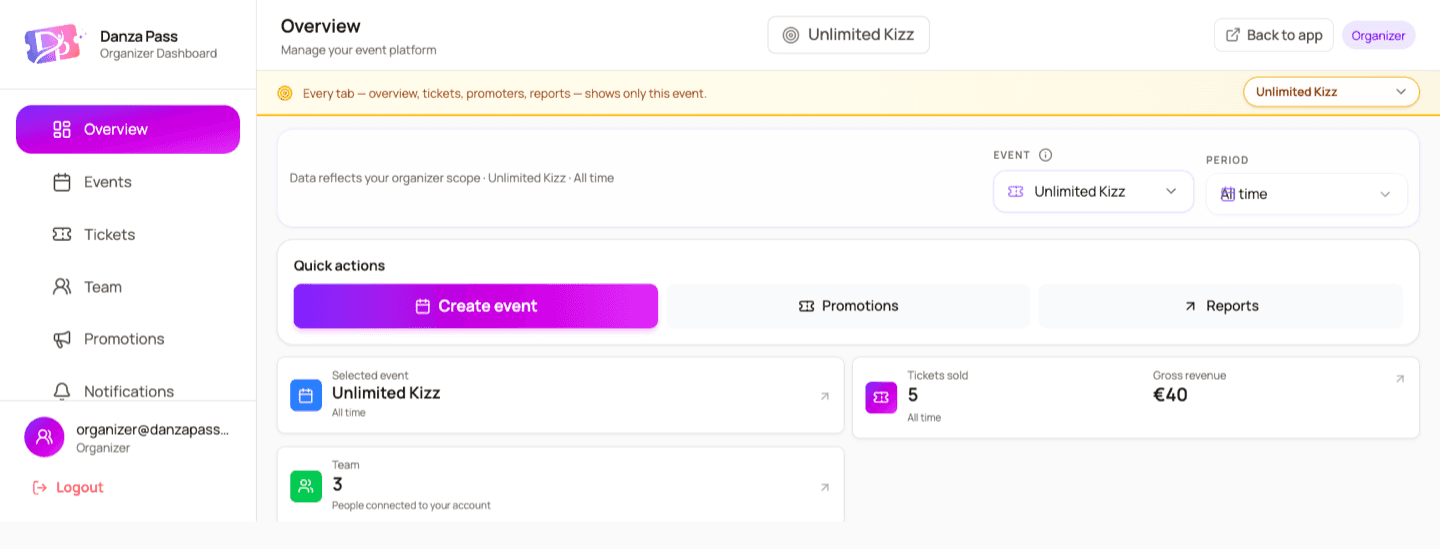
Overview
Your event at a glance — tickets sold, gross revenue, top promoters, and an estimated settlement, all scoped to the event you're focused on.
Custom invite & application forms
Create dedicated forms for special guests, artists, DJs, volunteers, staff, vendors, sponsors, media, or any other group your event needs. You choose the questions and details, review each application, and issue the right pass when you approve.
Build any form your event needs
Create a guest list, volunteer application, artist registration, staff form, vendor request, or a completely custom form — with your own title, welcome message, questions, and extra information.
Your own public link
danzapass.com/guest/your-festival — share it on Instagram, WhatsApp or by email so every group has one clear place to apply.
Solo and bundle pricing
Set a solo price and a bundle price for 2–10 guests (couples, crews, teams). Free is fine too.
Card or direct payment — 0% platform fee
Let guests pay by card through Danza, pay you directly (cash at the door, bank transfer), or offer both. Guest forms carry no platform fee.
You approve, we issue the pass
Every application lands in your dashboard. Approve it and each guest gets a real pass with your custom label on it — “Special Guest”, “Artist”, “VIP” — scannable at the door like any other ticket.
Perks and links, up front
List what's included (drinks coupons, accommodation tips, backstage access) and your social links, so guests know exactly what they're applying for.
Runs without you
The things that used to eat your evenings — “I can’t come, can my friend take my pass?”, refund requests, guest lists, door lists — are rules you set once. Danza applies them, moves the money, issues the passes and tells everyone involved.
A dancer who can’t make it hands the pass to a friend — in the app, by themselves.
You set
Danza does
We charge the fee, void the old QR, issue a new pass to the new name, notify both dancers, and log it in your Name changes tab. Nothing to approve unless you chose to.
Offer a refundable option at a small premium — dancers buy earlier when they know they can change plans.
You set
Danza does
Cancellations before the deadline are refunded automatically minus the Flex fee; the refund amount is reserved from your balance so payouts never go negative. No emails, no manual Stripe refunds.
Artists, DJs, sponsors’ guests, volunteers — a public application form instead of a ticket link.
You set
Danza does
Applications land in your dashboard; approve one and the guest gets a real, scannable pass by email and in the app.
Give each promoter or team a code and watch what it sells.
You set
Danza does
Every sale is attributed automatically; promoters see their own numbers in the app, you see all of them.
Your door staff scan with their own phones — no hardware, no spreadsheets.
You set
Danza does
Instant valid / already-used / wrong-day answers, live check-in counts, and name-changed passes scan for the new holder only.
Schedule moved, venue changed, doors open later — send any update your dancers need from your Notifications panel.
You set
Danza does
Danza delivers it only to current active pass holders, keeps their contact details private, and also sends automatic event-change alerts and reminders. No mass-email lists or WhatsApp chaos.
iOS & Android
Everything in the web dashboard is in the Danza app too — so you can handle the festival from the venue, the airport or the dance floor. One app for dancers and organizers; switch to your organizer workspace in a tap.
Live sales & check-ins
Passes sold, revenue, who’s in — updating as it happens, per festival or across all of them.
Edit the event anytime
Dates, venue, passes, line-up, schedule — and the social wall builder, with a live preview on your phone.
Team, promoters & payouts
Invite staff and co-organizers, see promoter numbers, withdraw to your bank, read reports.
Scan at the door
Your staff check passes with their own phones — valid, used or wrong day, instantly.
Name changes & guest requests
Approve transfers and guest applications from the notification, not from a laptop.
The social wall is built into the event editor on both web and app — same wall, same link, edit it wherever you are.


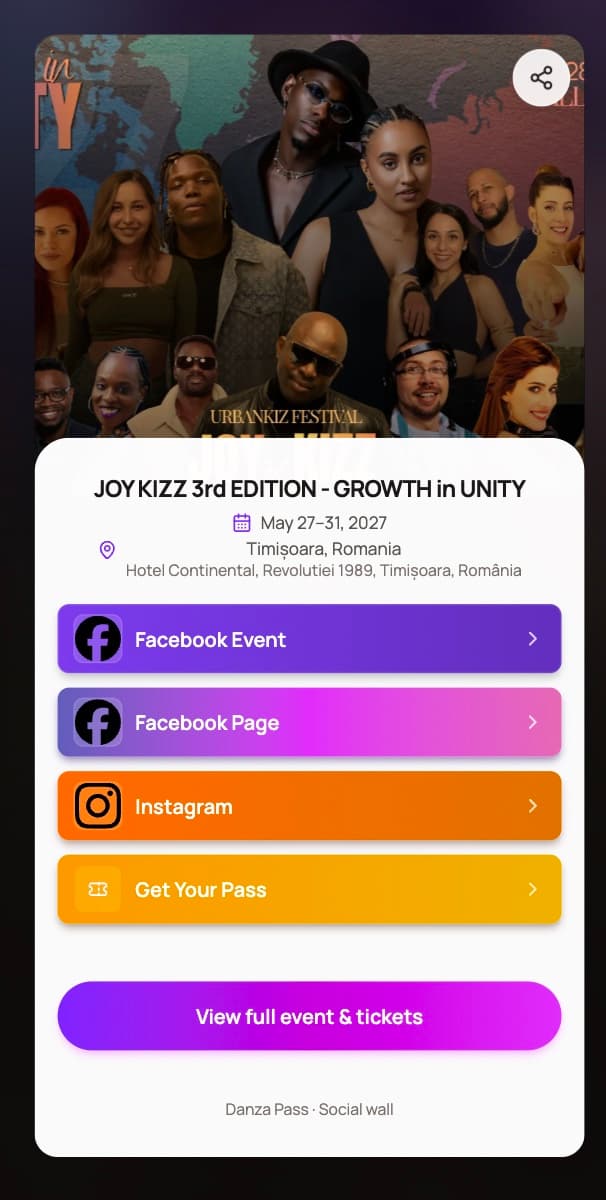
Real wall — JOY KIZZ 3rd edition, Timișoara
Your link-in-bio wall
Every event on Danza comes with its own wall: a beautiful page — web and mobile — with your cover, a short intro and big tappable buttons for everything around the festival — tickets, Facebook event, Instagram, WhatsApp group, hotel deals, playlist. Put that one link in your bio, your posts and your QR flyers.
Make it yours
Pick a color or gradient for every button — ten presets or your own hex — add icons or flyer crops as thumbnails, write the intro text. It looks like your festival, not like our template.
Drag to reorder, change anytime
Reorder buttons by dragging in the dashboard. Early-bird week? Move “Get your pass” to the top. Festival week? Put the WhatsApp group first. Changes are live instantly — same link.
Tickets built in
A “Get your pass” row is included and always in sync with your sales — label, color and position are yours to set. No more “link in comments”.
Share everywhere
Copy the link, open the share sheet or drop it on a QR flyer. The wall carries your cover image as the social preview, so it looks great when pasted in Instagram, WhatsApp or Facebook.
Included, like everything else
The wall is part of every event — no extra plan, no per-link limits, no branding we force on you. More customization is on the way, and organizers' ideas shape what comes next.
Not just cards. Checkout offers the wallets and local methods dancers already use — shown automatically for their country and device, all processed by Stripe.
Local methods appear where they're expected — Bancontact in Belgium, EPS in Austria, iDEAL in the Netherlands. Nothing to configure, and every sale lands in the same payout balance.
Organizer
Receives 100% of the ticket price (face value) to your connected Stripe account.
Danza (platform)
Collects €1 per ticket via application fee / marketplace split on the charge.
Stripe
Keeps card processing fees according to your Stripe pricing.
Sell tickets, track your balance, and withdraw available funds to your bank account.
Set up your payout account (once, about 5 minutes)
Buyer pays for a ticket
When someone buys a ticket, the payment is processed securely.
Your sales appear in your balance
You'll see ticket sales in your Danza balance after payment confirmation.
Funds become available based on the ticket type
Withdraw to your bank
When funds are available, click "Withdraw to bank". Payouts usually arrive in 2–3 business days; your very first payout can take 7–14 days while Stripe verifies your account.
Refunds and cancellations are protected
Refundable tickets, disputes, and event cancellation cases may keep some funds locked until they are resolved.
Danza uses secure payment partners to process payments, verify payout accounts, and send funds safely. We never see or store your ID, bank details, or card numbers.
Payout accounts are available in 43 countries — every EU/EEA member plus the UK, Switzerland, North America, and more. Pick yours once during setup; Stripe then verifies you under that country's rules.
European Union & EEA · 29
Also supported · 14
Pick the country where you (or your company) are legally based — your payout account is opened there.
A different setup?
Your event may still be a fit for Danza. If you already process registrations or payments through your own system, run a free event, or operate in a country that is not supported yet, contact us. We’ll review your setup and explore whether a tailored collaboration could make sense.
Custom arrangements are reviewed individually and are not guaranteed.
Enter your ticket price and see what buyers pay — and what you keep.
Card processing is charged once per checkout, so selling multiple tickets in one order shares the fixed fee.
| Line item | Amount |
|---|---|
| You receive | €100.00 |
| DanzaPass fee (€1 × ticket) | €1.00 |
| Card processing (1.5% + €0.25 per order) | €1.75 |
| Buyer pays (total) | €102.75 |
Uses the same rates as live checkout on standard European cards. Actual card processing can vary by card type and region.
Create a free organizer account and build your first event when you’re ready.
Become a partner & sell tickets